
Cloud CMS, onboard players, GPS and cellular links keep rooftop LEDs and in-cabin tablets synced for DOOH scheduling and proof-of-play.
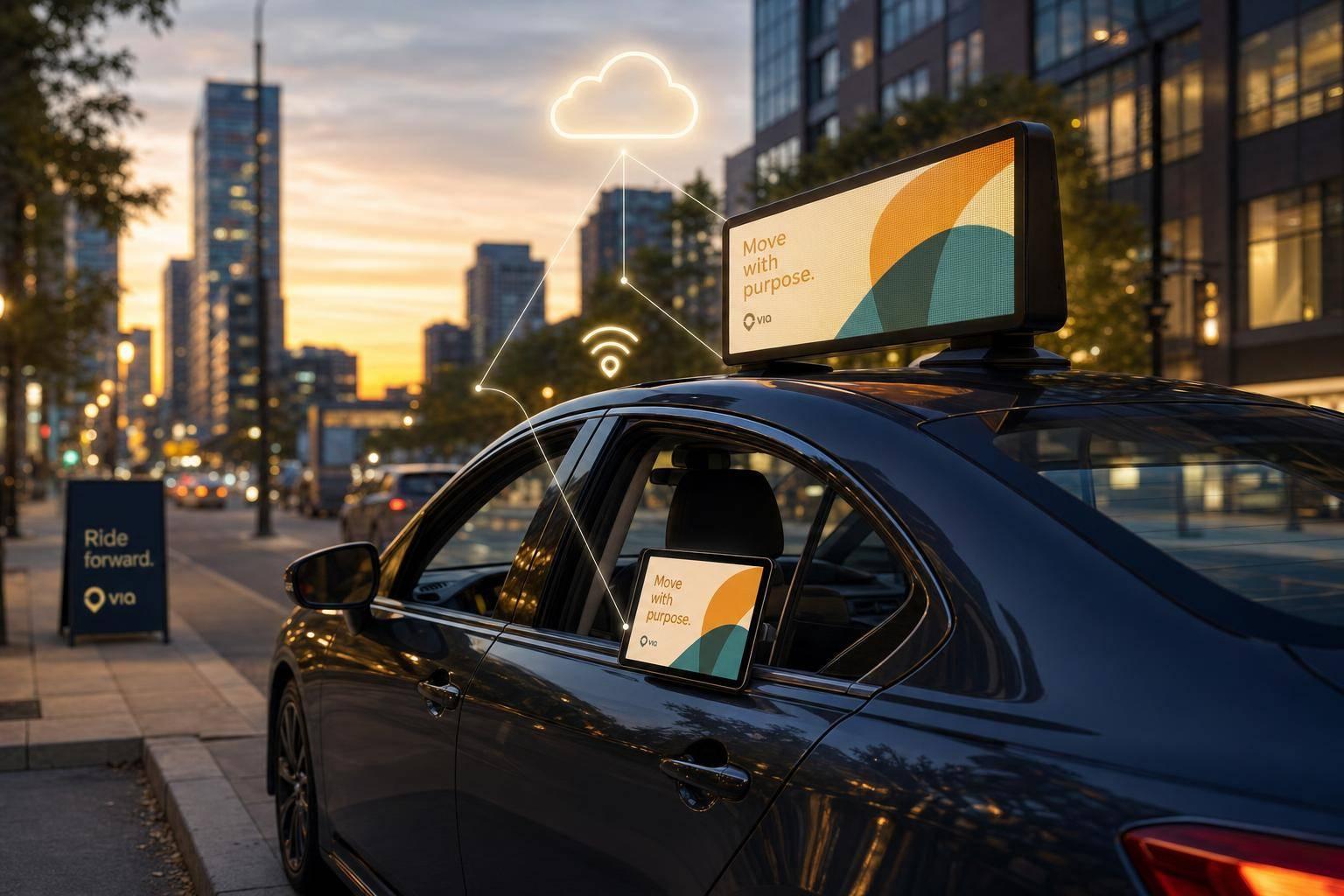
If vehicle screens are not synced, ad delivery turns messy fast. I’d boil this guide down to one point: a cloud CMS, local media player, GPS, and cellular link work together so rooftop LEDs and in-car tablets can play the right ad, in the right place, at the right time - even when a vehicle loses signal.
Here’s the short version in plain English:
A few hard numbers stand out:
Quick comparison
| Area | What matters most | Why it matters |
|---|---|---|
| Cloud CMS | Scheduling, targeting, reporting | Keeps fleet control in one place |
| Media player | Local cache, GPS handling, log storage | Playback continues when signal drops |
| Rooftop LED | High brightness, weather protection | Reaches people outside the vehicle |
| In-cabin tablet | Touchscreen, rider detection | Reaches passengers inside the vehicle |
| Cellular + GPS | Sync, proof of play, geo triggers | Connects delivery to time and place |
If I were reviewing a vehicle DOOH setup, I’d focus on four things first: local caching, clock sync, reconnect behavior, and proof-of-play logs. Those four points decide whether a fleet runs like one network or a loose group of screens.
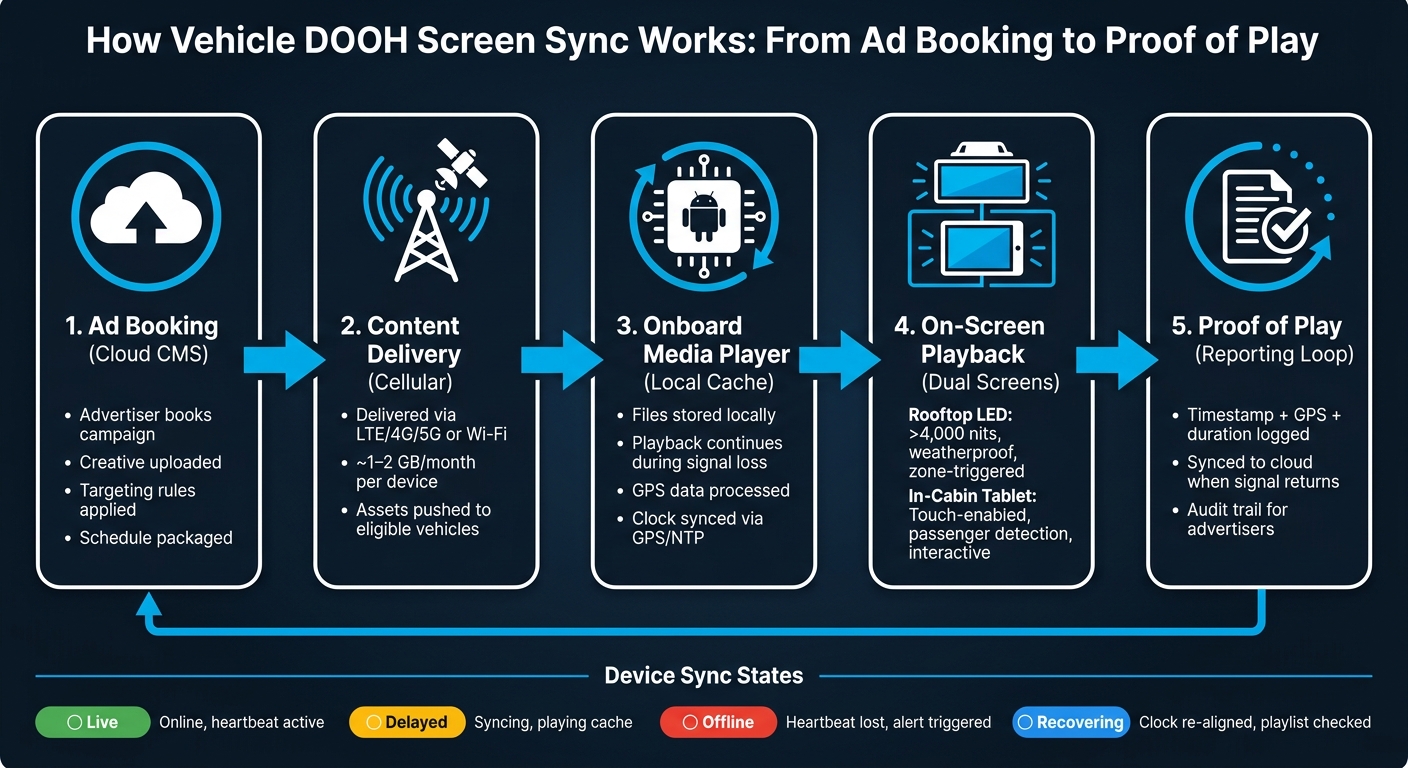
How Vehicle DOOH Screen Sync Works: From Ad Booking to Proof of Play
Vehicle screen sync rests on four layers: cloud controls, onboard players, screens, and connectivity. Each one has its own job. The system stays dependable only when all four work together. That setup matters because sync comes down to timing, signal loss, and how the system recovers when a vehicle goes offline.
The cloud platform acts as the control center for remote management. Operators upload creative assets, set schedules, define geofenced zones, and manage programmatic ad delivery from one dashboard. Onboard media players, usually Android-based, render content locally, cache assets, process GPS data, and send health logs back to the cloud. That local processing is a big deal. It means ads can keep running even when the cellular signal drops.
The screens do different jobs depending on where they sit. Rooftop LED screens speak to people outside the vehicle. In-cabin tablets speak to passengers inside it. Rooftop LED panels are often dual-sided and are commonly recommended at >4,000 nits brightness so they stay visible in direct sunlight. Interior LCD tablets, often 10.1" or 13.3", face passengers and support touch interaction, QR codes, and dynamic content. A GPS module sends location data to the player, which allows geo-triggered ad delivery with less than 1 meter precision.
| Component | Primary Function | Key Requirement |
|---|---|---|
| Rooftop LED Screen | External ad display for pedestrians and drivers | >4,000 nits brightness, weatherproof |
| In-Cabin LCD Tablet | Passenger-facing interactive content | Vibration resistance, touch-enabled |
| Onboard Media Player | Local rendering, caching, GPS processing, log storage | Android OS, local NAND flash storage, LTE |
| Cloud CMS / Ad Server | Schedules, timing rules, and playback state | Web-based, SSP/DSP integrations |
| GPS Module | Real-time location triggers for geo-targeted ads | 41-channel, less than 1 meter precision |
| Cellular Connectivity | Asset delivery, schedule sync, health and playback log upload | LTE/4G/5G, ~1–2 GB/month per device |
Once an advertiser books a campaign in the CMS, the platform packages the approved creative, applies the targeting rules, and syncs the content to eligible devices over LTE/4G/5G or Wi-Fi. After the download finishes, the onboard player stores the content locally and runs the playlist on schedule. In plain English: playback comes from the local cache, not from a live connection.
After each ad plays, the player records the timestamp, GPS coordinates, and duration. It then sends that data back to the cloud as a proof-of-play record. That loop matters because a moving fleet won't have perfect coverage all day, and the system still needs a clean record of what ran, where it ran, and when it ran.
Since vehicles lose signal all the time, local content caching is one of the biggest design calls in this setup. It keeps playback going through dead zones and helps protect proof-of-play data. When the connection comes back, the player automatically syncs logs and pulls any pending schedule updates. That's what helps keep vehicles aligned even after signal loss or a restart.
Power design matters too. Voltage monitoring can shut screens down below 12V to protect the battery. Tying screen power to ignition helps with safer starts, cleaner shutdowns, and fewer battery problems. At that point, reliability depends less on pushing content out and more on timing, heartbeat checks, and reconnect behavior. For fleet operators moving past a small pilot, those choices make it much easier for the network to handle reconnects and power cycles without falling out of sync.
Vehicle screen sync matters most when fleets move through areas with spotty signal. In that setting, playback still has to stay lined up. Once a fleet is live, the job shifts from setup to day-to-day control: making sure every screen on every vehicle plays the right ad at the right time, even as coverage drops in and out. That timing layer shapes how the system deals with missed signals, lag, and reconnects.
Most vehicle screen networks rely on a lead-player model. One onboard player serves as the time source for the other screens on that vehicle, usually the unit tied to the GPS module. That setup helps limit drift when vehicles pass through dead zones or switch routes.
The lead player uses GPS or NTP to resync clocks after reconnecting. Follower screens sync their internal clocks to the lead player, not to the cloud directly. Put simply, one device keeps everyone else on the same beat.
To stay in sync, each device sends regular heartbeat signals to the cloud CMS. These short status pings show that the screen is online and playback is active. If a heartbeat is missed, the CMS flags the device so operators can check it. This gives teams real-time fleet monitoring from one dashboard.
Disconnects are part of the job when screens are moving. The system deals with that by playing from the local cache, so content keeps running from onboard storage during a cloud outage. What changes is the sync status the CMS reports for that device.
| Sync State | What It Means | What the System Does |
|---|---|---|
| Live | Online and playing the current schedule | Sends regular heartbeat signals |
| Delayed | Asset or schedule sync in progress | Plays cached content and preloads new assets in the background |
| Offline | Heartbeat lost or device powered down | CMS triggers an alert and logs the last known GPS location |
| Recovering | Device is reconnecting | Re-aligns the clock with GPS/NTP and checks for playlist updates before resuming |
When a vehicle comes back online, the player re-aligns its internal clock, checks for any schedule updates it missed, and then resumes synchronized playback. That recovery flow helps stop vehicles from slipping onto stale schedules after a restart.
For fleet-scale sync to hold up, the hardware and network setup need to meet a few firm standards. On the network side, reliable sync calls for LTE/4G or 5G cellular service, while Wi-Fi is better kept for local updates. On the hardware side, anti-vibration construction is a must, and industrial-grade Android players with custom firmware support kiosk mode, auto-start, and ignition-based shutdown.
Hardware also needs a temperature rating from -4°F to 140°F (-20°C to 60°C) so it can keep working across U.S. weather conditions.
With device timing under control, the next layer is deciding which content each screen should play and when.
Once timing is in sync, scheduling decides what runs, where it runs, and when it appears. Since every vehicle works from the same timing layer, operators can change schedules without throwing off fleet-wide alignment.
Fleet operators can plan campaigns far ahead in a web-based CMS, and updates reach eligible vehicles within minutes. That makes it easy to set rules around date ranges, weekday vs. weekend delivery, and local time windows.
Time is only part of the story. Route-zone targeting is where scheduling gets much more precise. Operators split cities into defined zones - airport corridors, retail districts, entertainment areas, or commuter routes - then change pricing and targeting on the fly based on where vehicles are moving. Advanced scheduling can also use traffic, weather, date, daypart, zone, and nearby commercial areas to keep the ad message relevant. Enroute View Media uses geo-time targeting to trigger zone-based delivery with GPS precision.
Once the schedule is in place, the next job is matching the right creative to the right screen and audience.
Rooftop LEDs and in-taxi tablets reach different people, so each one needs its own schedule and creative rotation. They may sit on the same vehicle, but they don't do the same job.
| Factor | Rooftop LED Screen | In-Taxi Tablet |
|---|---|---|
| Audience | Pedestrians, other drivers | Captive riders |
| Ad format | Short-loop content | Interactive content |
| Targeting basis | Neighborhood / zone | Passenger presence |
| Scheduling trigger | GPS zone entry | Camera-based passenger detection |
For interior tablets, camera-based passenger detection means ads play only when a rider is present, which cuts wasted impressions in empty vehicles. On rooftop screens, creative can change by zone as the vehicle moves through the city. So one screen can show one message downtown and a different one near the airport.
That split matters. Exterior and interior screens support different ad goals, so they shouldn't run on the same rotation logic.
After creative is mapped to each screen type, pacing rules help keep impression delivery balanced across the fleet.
Vehicles don't move in equal patterns. One driver may spend hours in a high-value airport corridor, while another stays on suburban routes most of the day. Without pacing, one route can overdeliver while others fall short.
Fleet operators handle this with campaign priorities and pacing rules inside the CMS. Screen eligibility rules can also decide which vehicles qualify for a campaign. Premium zones should carry higher priority and pricing. Pacing and pricing protect premium zones, while SSP integrations help improve fill as demand grows.
Those same rules also feed screen monitoring, proof of play, and delivery reporting.
Pacing rules and zone priorities only matter if operators can see that every screen is doing its job. Monitoring, proof of play, and programmatic delivery are what close that loop.
Once pacing is live, operators need to confirm the fleet is delivering the way it should. A cloud-based CMS gives them a live view of every device in the fleet, including online/offline status, live screenshots, content download progress, and player uptime.
The CMS should also flag failed downloads and weak connectivity so teams can fix problems before delivery starts to slip. And predictive diagnostics can warn operators about outages and hardware faults before playback breaks down.
Those alerts also feed the proof-of-play record advertisers count on.
Each play creates a log with the time, location, duration, and impression count. The CMS then checks those logs against the schedule to confirm delivery on the planned screen, in the planned zone, and during the planned time window.
That check becomes the audit trail created by synchronized playback. In plain English, proof of play is what makes a synced fleet accountable, not just organized.
Advertisers can also use self-service portals with real-time maps that show vehicle movements and playback locations, along with exportable reports for post-campaign review.
When delivery is verified, those same logs can also support programmatic sales.
SSP integrations let fleet inventory enter programmatic demand streams without leaving the same CMS. This works best when sync, scheduling, and reporting stay in one system. Synchronized inventory, verified delivery, and centralized scheduling are what make programmatic activation workable across moving vehicles.
Synced vehicle screens keep running even when the signal drops. Enroute View Media sends content updates from the cloud to each vehicle, and the files are saved directly on the device.
That means if connectivity cuts out, the screen doesn't go dark or freeze. It keeps playing its scheduled playlist, loops, or trigger-based content on its own.
Once the connection comes back, the system automatically syncs new updates, analytics, and reporting data back to the central server.
The main difference comes down to who sees the ad and how they interact with it.
Rooftop LED screens are built for broad outdoor visibility. They’re meant to catch the eye of people nearby, whether they’re walking, driving, or waiting at a stoplight.
In-cabin tablets, on the other hand, reach a captive passenger audience. And unlike rooftop screens, they support touch-screen interaction, which opens the door to a more hands-on ad experience.
Both run on the same cloud-based platform and support real-time updates and geo-time targeting. But they work separately in practice, so you can control each one on its own.
That means you can set up different:
for each screen type.
The most important proof-of-play metrics in vehicle DOOH are timestamps, GPS location, and total play duration. Together, they show when, where, and for how long your content appeared.
For fleet operations, impression counts and screen uptime matter too. Enroute View Media provides playback verification reports and secure, real-time portal access, so you can check delivery accuracy and campaign reach with confidence.
Need pricing details?
EnrouteViewMedia is a Canadian technology company based in Edmonton, Alberta, Canada. The company was founded by a group of media entrepreneurs and engineering executives. Our mission is developing leading-edge digital media display technologies for taxicab rooftops and taxicab interiors advertising market. Through our easy to use ad delivery and management system, we assist our clients in reaching their customers with targeted exposure. EnRouteViewMedia continuously strives to be the global leader in digital geo-time targeted advertising media systems for modern taxi fleets.