
How programmatic DOOH automates bidding for vehicle screens, targets by route/time, and logs proof-of-play for real-time optimization.
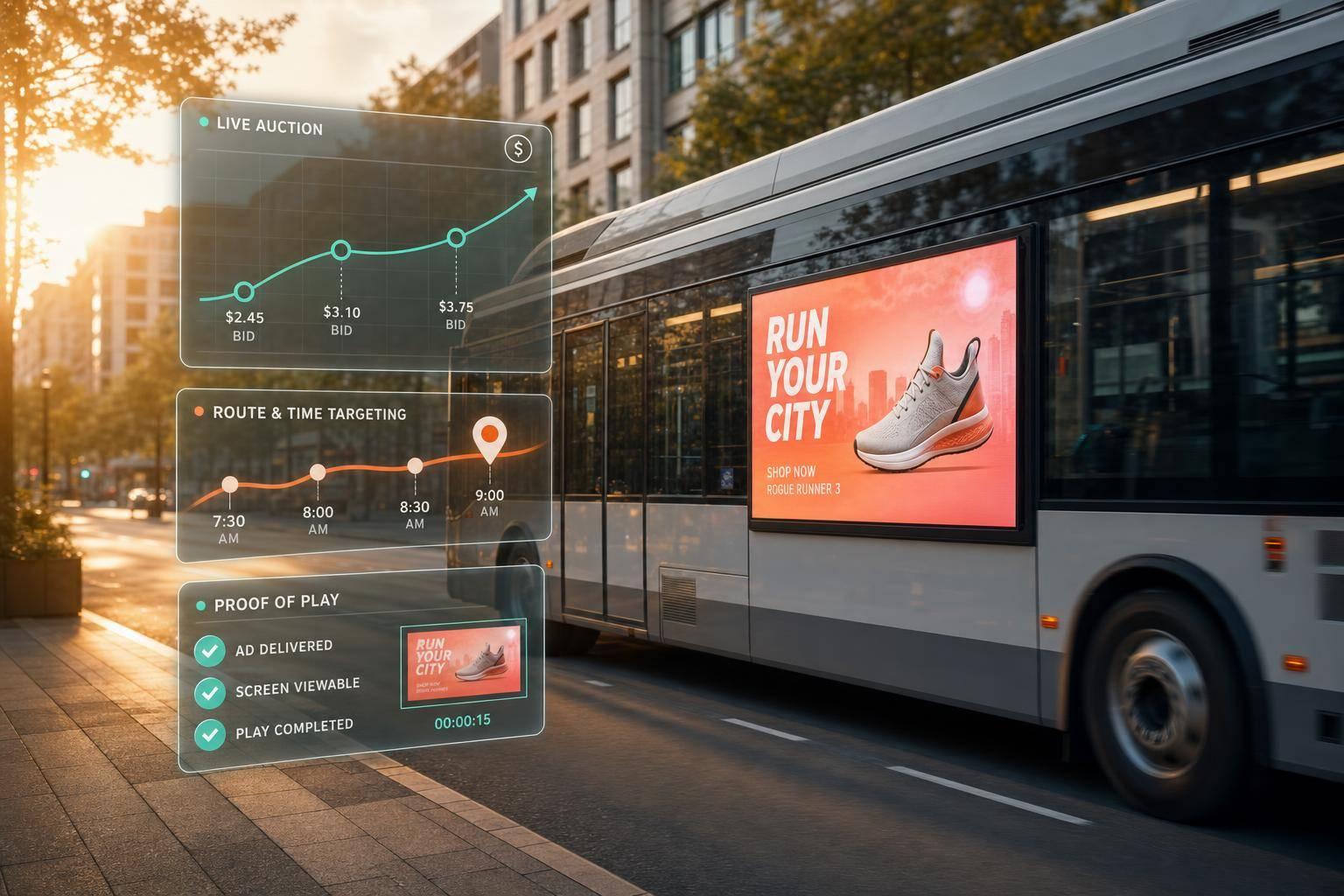
Programmatic DOOH is simple at its core: you set rules, software bids on screen time, and each ad play gets logged. For vehicle screens, that means ads can run by location, time, route, weather, and rider presence instead of fixed manual buys.
If I had to boil the article down fast, it comes to this:
A few facts stand out:
| Format | Who sees it | Best use | Typical viewing context |
|---|---|---|---|
| Rooftop LED | Pedestrians and drivers | Street visibility across busy routes | Short glances in traffic or on sidewalks |
| In-taxi tablet | Passengers | Longer messages, touch features, QR use | 10–30 minute rides |
In other words: programmatic vehicle DOOH turns moving screens into rule-based ad inventory that can be bought, served, and checked in near real time. What matters most is choosing the right screen type, setting clear triggers, and watching route-level results closely.
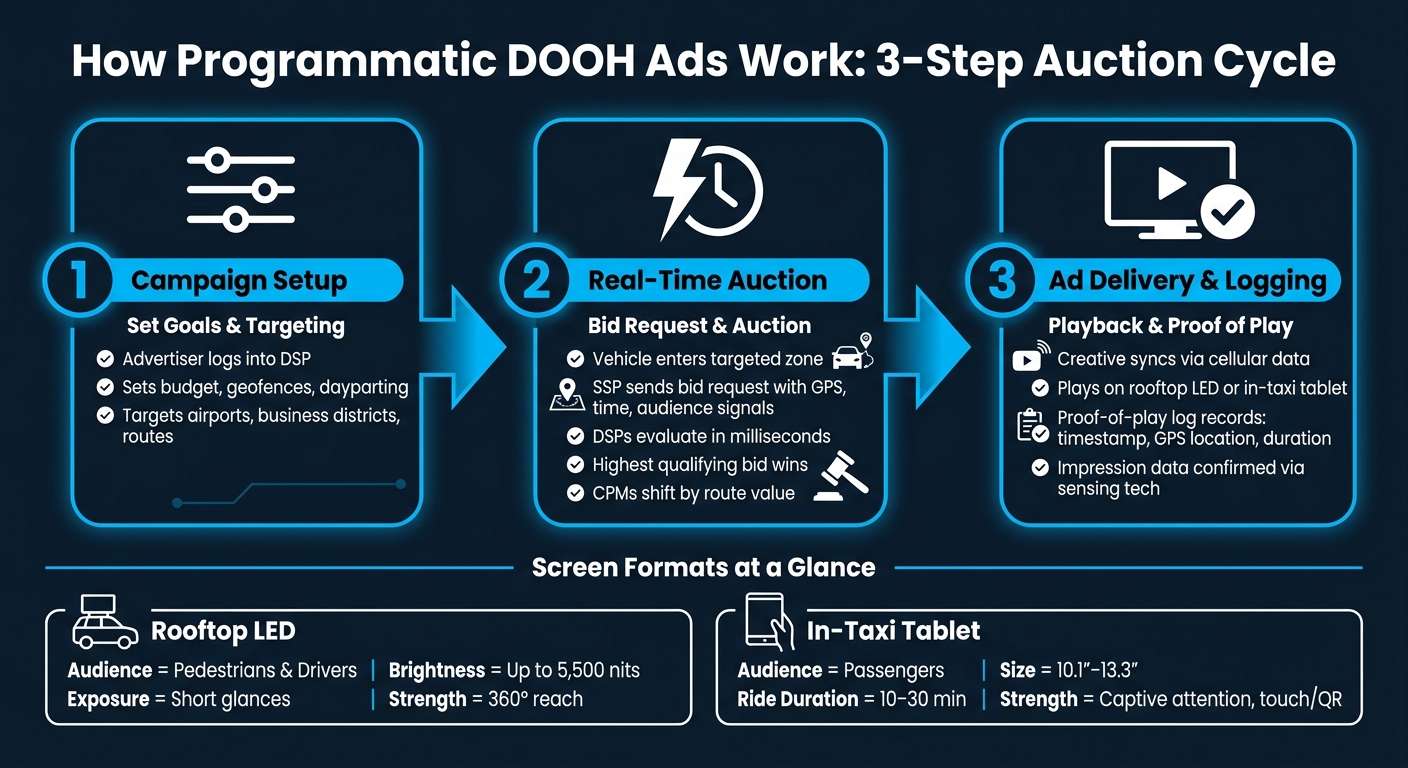
How Programmatic DOOH Ads Work: 3-Step Auction Cycle
Advertisers start in a DSP, where they set campaign goals, budget, and route-based targeting. Once those rules are in place, the platform can begin matching live vehicle inventory to the campaign.
For vehicle-based campaigns, targeting can get very specific. Advertisers can place geofences around high-value areas like airports or downtown business districts. They can also use dayparting, so ads run only during set times of day.
Next, each eligible screen can trigger a bid request. When an ad slot opens as a vehicle enters a targeted zone, the platform sends a bid request to connected DSPs through SSP integrations. That request includes real-time signals like the vehicle's GPS coordinates, the current time, and - on vehicles equipped with sensing hardware - anonymized audience signals, such as estimated age and gender.
DSPs check those signals against active campaign rules in milliseconds. If the location, time, and audience match the campaign, the DSP submits a bid. The highest qualifying bid wins the slot, and CPMs shift based on the value of that exact moment and location. That’s why higher-value routes often come with higher CPMs.
After the auction, the process moves straight to playback and logging. Once a bid wins, the creative is sent to the vehicle screen and queued for playback. It then appears on either the rooftop LED display or the in-vehicle tablet, depending on the inventory purchased. The creative syncs over cellular data, usually within minutes.
Each play creates a proof-of-play log with a timestamp, GPS location, and duration. These logs confirm delivery and support billing. Audience sensing data stays anonymized, and passenger presence can help confirm actual exposure instead of just screen uptime.
Once you understand the auction model, setup gets pretty simple: pick the right routes, choose the right screens, and set clear rules for when ads should run.
Start with movement patterns. Look at where your audience actually travels, not just where they live or work. Then set geofences around the routes and zones they use most. Tight geofences help trigger ads when a vehicle enters a defined area.
Screen format comes first because it shapes everything that follows, from the ad itself to timing and triggers. Rooftop LED screens work best when you want broad street-level visibility. They can reach pedestrians and nearby drivers, with exposure from multiple angles, including up to 360°.
In-taxi touchscreen tablets do something different. They speak straight to passengers during the ride. Most are 10.1" or 13.3", and they reach people during trips that usually last 10 to 30 minutes.
| Rooftop LED | In-Taxi Tablet | |
|---|---|---|
| Primary Audience | Pedestrians & drivers | Passengers |
| Brightness | Up to 5,500 nits | Standard tablet brightness |
| Interactivity | Visual only | Touchscreen, QR codes, games |
| Key Strength | High reach, 360° exposure | Captive attention, 10–30 min rides |
Rooftop screens need simple ads. Fast. Most people will only glance at them for a few seconds, so the message has to land right away. Use strong contrast, keep the copy short, and focus on one idea. Screens with a pixel pitch of P2.5 to P5 and brightness up to 5,500 nits can stay visible in direct sunlight, but the ad still needs to be easy to read from a distance.
In-taxi tablets give you more space and more time. Riders are seated, often waiting, scrolling, or just looking around. That makes room for touch-based features and longer messaging. A good starting point is 20-second video and 10-second static creatives.
After the creative is done, decide how the campaign should run. Set a daily cap so you don't burn through budget during low-traffic hours. Use dayparting to push delivery into the times that matter most, like lunch offers around noon.
Trigger-based rules can make spend much tighter. You can set campaigns to turn on based on passenger presence, weather, or a target zone. That means fewer wasted impressions and a better shot at reaching people when they're actually there. Those same rules also shape reporting and later optimization.
Once a campaign goes live, the focus shifts to reporting. You need to see what ran, where it ran, and who it likely reached. In practice, that means checking each play against location, time, and audience signals.
Impressions and proof of play are not the same thing. Impressions estimate how many people saw an ad, usually based on sensing tech or front-facing cameras. Proof of play is different - it's a verified record showing the exact time and place an ad ran.
| Metric | What It Measures | Data Source |
|---|---|---|
| Impressions | Estimated audience exposure per play | GPS & camera sensors |
| Proof of Play | Verified ad execution | Cloud CMS logs |
| Reach & Frequency | Unique viewers and how often they saw the ad | Sensing technology |
| Pacing | Budget consumption rate vs. delivery schedule | Real-time platform data |
From there, route-level reporting helps show which paths and dayparts drove the best results.
Reach and frequency matter a lot in urban markets, where the same people may see the same campaign more than once. Tracking both helps prevent overexposure and makes budget allocation more efficient.
When you break performance data down by ZIP code, neighborhood, or route, you can see where a campaign is doing its job. Real-time GPS and engagement data can move ad delivery into peak traffic windows, which can increase audience engagement. That level of detail also makes it easier to focus on zones near competitor locations or high-footfall areas like airports and business districts. When performance is compared by route and daypart, moving budget stops feeling like a guess and starts looking like a direct call.
A single platform can turn reporting into live campaign control. Enroute View Media connects planning, delivery, and measurement through one cloud-based ad and screen management platform. Advertisers can monitor screen uptime in real time, view live screenshots, and get alerts when a device goes offline, which helps spot wasted spend fast. Playback verification brings together timestamps, GPS locations, duration, and impression counts in detailed reports. The platform uses high-precision GPS for route-level reporting under 1 meter, which makes zone-level optimization much easier to act on.
Programmatic DOOH on vehicle screens runs on a simple loop: automate the buy, deliver by rule, and verify each play. Campaign rules decide which auctions a campaign can enter, winning bids send creative to eligible screens, and proof-of-play records confirm delivery.
That loop is the core strength of vehicle-based DOOH. Every play is logged. Every route can be measured. Spend can shift in real time. That’s what makes the format usable in practice - route-level analytics and real-time dashboards let brands act on performance instead of just reporting on it.
Enroute View Media supports this model from end to end, linking programmatic delivery with the real-time visibility needed to optimize a moving fleet campaign.
Programmatic DOOH swaps manual, pre-booked ad placements for automated, data-driven buying.
With a fixed ad buy, you reserve specific inventory for a set period. Programmatic works differently. It uses demand-side platforms and automated bidding to handle transactions in real time.
With Enroute View Media, fleet operators can connect with programmatic partners to tap into broader demand, support dynamic CPMs, and use geodata and contextual signals to serve ads more efficiently.
Choose based on what you want the campaign to do.
If your goal is citywide visibility and strong impression volume, go with P2.5 LED rooftop screens. The dual-sided setup puts your message in front of more pedestrians and nearby drivers, which helps you get more eyes on the ad across the city.
If you want deeper passenger engagement, pick 10.1-inch in-taxi touch-screen tablets. They work well for targeted messaging, interactive content, and engagement data capture.
Impressions on moving screens are measured through playback verification. That means the system logs timestamps, GPS locations, and how long each ad plays.
Since vehicles are always on the move, measurement systems track each exposure on its own. So if someone sees the same ad more than once during a single ride, each view counts as a separate impression.
That approach supports accurate audience reporting for screens both inside and outside the vehicle.
Need pricing details?
EnrouteViewMedia is a Canadian technology company based in Edmonton, Alberta, Canada. The company was founded by a group of media entrepreneurs and engineering executives. Our mission is developing leading-edge digital media display technologies for taxicab rooftops and taxicab interiors advertising market. Through our easy to use ad delivery and management system, we assist our clients in reaching their customers with targeted exposure. EnRouteViewMedia continuously strives to be the global leader in digital geo-time targeted advertising media systems for modern taxi fleets.