
SSPs sell vehicle screens, DSPs buy them, and screen-management systems control playback—confirm pricing, targeting, and proof-of-play.

An SSP sells vehicle-screen ad space. A DSP buys it. Neither controls where the vehicle goes. Before I launch a campaign, I confirm who handles pricing, targeting, screen playback, and delivery records.
I separate the work into three parts:
For example: A 5:00–9:00 p.m. geofence limits eligible ad opportunities. It does not send taxis to your location. And <u>a winning bid is not proof that an ad played</u> - or that anyone saw it.
Quick Comparison
| Decision | SSP | DSP |
|---|---|---|
| Inventory | Makes eligible ad space available | Selects available placements |
| Targeting | Supplies supported signals and seller rules | Chooses supported locations, times, and audiences |
| Pricing | Sets floors and seller terms | Sets bids, spending limits, and pacing |
| Deals | Sets terms and buyer access | Accepts terms or bids |
| Reporting | Tracks sales, fill, and revenue | Tracks spend, delivery, and results |
Before paying for delivery, I check ad-file requirements, GPS timestamps, buying connections, fees, and playback records. I also keep recorded plays, estimated impressions, and estimated reach separate. Enroute View Media’s screen tools support playback and device management; that role does not make them an SSP or DSP.
Control is split across three systems:
| Platform Role | Typical user | Main Responsibilities |
|---|---|---|
| SSP (supply-side platform) | Fleet owner, vehicle-media operator, or sales team | Package eligible inventory; enforce selling rules; manage auctions and deals; track fill rate and revenue |
| DSP (demand-side platform) | Advertiser or agency | Choose inventory; apply supported targeting; manage creative, bids, budgets, and pacing |
| Screen-management system | Fleet operations team | Monitor devices; distribute content; manage schedules; collect playback and operating data |
The SSP packages eligible inventory for sale. Listings should distinguish rooftop LEDs from in-cabin tablets and include screen size, creative specs, approved locations, and hours. Only screens with verified uptime and playback data should be listed as available.
The screen-management system supplies device status and playback records for SSP sales and reporting. Sellers should review auction activity, unsold capacity, fill rate, and revenue by screen format and time window. Before comparing reports, check the fill-rate calculation: its denominator may count eligible opportunities, not all potential screen time.
The DSP handles the buyer’s side.
In a restaurant campaign, the buyer selects supported taxi-screen placements and requests evening opportunities from 5:00 p.m. to 9:00 p.m. within a supported geofence near the restaurant. The DSP evaluates available opportunities against those conditions. This buys eligible impressions near the restaurant; it does not control vehicle routes.
The restaurant or agency uploads creative that meets the format requirements, sets its budget and bid limits, and uses pacing to spread spending across the campaign.
Before buying, confirm whether location eligibility relies on current coordinates or broader service-area data, and how often that data updates. Audience and trip targeting depend on supported data sources, permissions, and integrations. They don’t come automatically with taxi inventory. If supply is limited, expand the geofence or extend the daypart.
Next comes who controls price floors, bid limits, deal terms, and reporting.
| Decision Area | SSP Authority | DSP Authority |
|---|---|---|
| Inventory | Defines eligible screens, slots, formats, and availability | Selects from inventory available to the campaign |
| Targeting | Supplies available targeting signals and enforces seller-side restrictions | Selects geography, dayparts, audience segments, frequency, and budget rules |
| Pricing | Sets floors, seller fees, auction rules, and seller-side revenue terms | Sets bid amounts, bid limits, budget, and optimization rules |
| Deals | Creates or authorizes PMP, preferred, or guaranteed packages and manages buyer access | Requests, accepts, or bids on eligible deals and applies campaign constraints |
| Delivery | Determines whether an impression can be sold and whether an ad meets screen and operational requirements | Chooses which eligible opportunities to bid on and which ad to submit |
| Reporting | Provides playback logs, sell-side revenue, clearing prices, fill, and supply-side delivery data | Provides bids, wins, spend, fees, targeting, optimization, and buyer-side delivery and performance data |
| Success metrics | Fill rate, yield, revenue, sell-through, and uptime | Reach, frequency, completed plays when measurable, cost efficiency, conversions, CPA, or ROAS |
Seeing inventory doesn't mean controlling it. Only the fleet operator or screen-management system controls vehicle assignment, uptime, route decisions, and playback.
If the seller floor is $10.00 CPM and the buyer bid cap is $12.00 CPM, the DSP can only bid inside that range. Passing the floor still does not guarantee delivery; targeting, creative approval, supply, and auction rules still apply.
Open auctions, PMPs, preferred deals, and programmatic guaranteed deals differ mainly in access and commitment. PMPs limit which buyers can participate. Preferred deals offer a first look at an agreed price. Guaranteed deals reserve volume or a schedule, provided the seller can fulfill it.
Proof of play, estimated impressions, and reach answer different questions. A playback record documents an event on a screen - not how many people noticed it. Estimated impressions model opportunities to see the ad, while estimated reach counts distinct people exposed at least once. Don't mark a scheduled event complete without playback evidence.
| Measurement | Seller Use | Buyer Use | Limitations |
|---|---|---|---|
| Playback | Documents scheduled or recorded ad delivery; supports billing and make-goods | Confirms that the ad was recorded as played | Does not establish audience size, attention, or conversion |
| Estimated impressions | Forecasts and reports audience supply that can be sold | Estimates exposure and supports CPM comparisons | Depends on the model; does not equal verified individual views |
| Fill rate | Measures the percentage of eligible opportunities monetized | Indicates supply availability and possible underdelivery | Can vary by screen, route, time, deal, targeting, and ad eligibility |
| Clearing price | Calculates seller yield and auction revenue | Evaluates media cost and auction competitiveness | May exclude platform, data, verification, or agency fees |
| Revenue | Measures gross or net seller earnings | Helps reconcile invoices and deal economics | Definitions differ in their treatment of fees, taxes, rebates, and revenue share |
| Spend | Supports buyer reconciliation, though it isn't the primary seller metric | Tracks budget use and optimization | DSP spend may not equal publisher revenue |
| Estimated reach | Evaluates audience scale and supports sales packaging | Measures distinct audience exposure and frequency | Requires deduplication and a stated methodology; estimates may not be directly comparable |
Use completion rate only when the system can reliably confirm that the full ad played. For example, screen playback logs can record the start, end, duration, interruptions, and errors.
CPA and ROAS need a suitable attribution design. Options include distinct promo codes, QR scans, landing-page events, matched-market testing, exposed-versus-control analysis, or another validated method. Before comparing results, align IDs, time zone, currency, billing event, fee treatment, reporting window, and impression methodology.
With pricing, access, and reporting terms set, launch depends on clean ad files and device data.
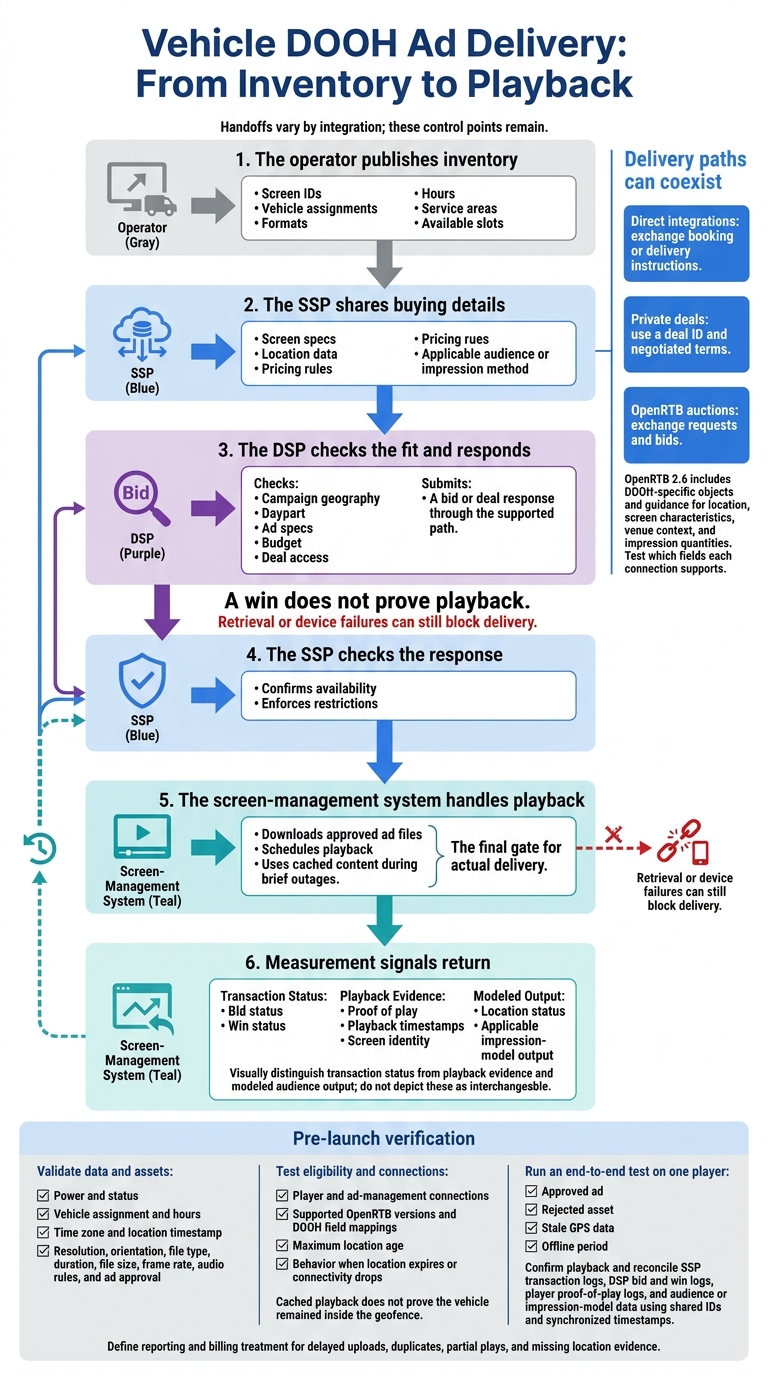
Vehicle DOOH Ad Delivery: From Inventory to Playback
Once pricing and reporting terms are set, delivery moves between the operator, SSP, DSP, and screen-management system. Each controls a different part of the process: publishing inventory, buying space, checking responses, or playing the ad.
The handoff varies by integration type, but these control points stay the same.
The delivery path depends on the integration type. Direct integrations exchange booking or delivery instructions. Private deals use a deal ID and negotiated terms. OpenRTB auctions exchange requests and bids. These paths can coexist.
OpenRTB 2.6 includes DOOH-specific objects and guidance for location, screen characteristics, venue context, and impression quantities. Test which fields each connection supports. A win does not prove playback: retrieval or device failures can still block delivery.
Before live traffic, check the data the SSP and DSP will use to approve delivery. This includes power and status, vehicle assignment and hours, time zone and location timestamp, resolution, orientation, file type, duration, file size, frame rate, audio rules, and ad approval. Test player and ad-management connections, supported OpenRTB versions, and DOOH field mappings - not just endpoint responses.
Set a maximum location age before launch. Compare the GPS timestamp with the eligibility check, and define what happens when location data expires or connectivity drops. Cached content may still play, but that does not prove the vehicle stayed inside the campaign’s geofence.
Run an end-to-end test on one player before accepting paid traffic. Include an approved ad, a rejected asset, stale GPS data, and an offline period. Confirm playback, then reconcile SSP transaction logs, DSP bid and win logs, player proof-of-play logs, and audience or impression-model data using shared IDs and synchronized timestamps. Document how delayed uploads, duplicates, partial plays, and missing location evidence affect reporting and billing.
Use these checks to verify whether the SSP can sell the impression, the DSP can buy it, and the screen system can prove the ad played.
Fleet owners and media operators control inventory and policies. SSPs sell, DSPs buy, and screen-management systems handle playback. Before launch, document who controls price floors, deal terms, bids, budgets, pauses, and make-goods. Access to a platform doesn’t automatically give you control.
Enroute View Media manages screens at the operations layer - not media transactions.
Its offerings include rooftop LED screens, in-taxi touch-screen tablets, and DigiStreamView, a screen-management platform. DigiStreamView supports content scheduling, playback verification, device monitoring, geo-time targeting, reporting, and programmatic integrations.
These tools support screen operations; they don’t make the platform an SSP or DSP. Before committing to a launch, confirm which buying connections serve your market and inventory, what fees and pricing controls apply, and how delivery will be measured.
Both SSPs and DSPs play a role in programmatic taxi and rideshare advertising. Fleet owners use an SSP to manage screen inventory and set minimum prices. Advertisers use a DSP to set targeting, campaign goals, budgets, and bids. An ad exchange connects the two.
Enroute View Media provides fleet management technology and integrates with SSPs. Advertisers still need a DSP to manage campaigns and bid on available ad slots.
Advertisers typically pay only for ads verified as played. Proof-of-play (PoP) logs confirm that an ad ran and record its timestamp, GPS location, screen ID, creative ID, and duration.
If an ad wins an auction but never plays, no PoP log is created for that slot. The transaction either doesn’t complete or isn’t billable.
Before committing budget, confirm that your Demand-Side Platform (DSP) enforces device-level targeting, including geofences, ZIP code layers, and dayparts.
Check that reporting provides GPS-tagged proof-of-play logs with coordinates for every ad play. Compare these auditable records with your intended boundaries to spot delivery outside your geofences and fine-tune future bids.
Need pricing details?
EnrouteViewMedia is a Canadian technology company based in Edmonton, Alberta, Canada. The company was founded by a group of media entrepreneurs and engineering executives. Our mission is developing leading-edge digital media display technologies for taxicab rooftops and taxicab interiors advertising market. Through our easy to use ad delivery and management system, we assist our clients in reaching their customers with targeted exposure. EnRouteViewMedia continuously strives to be the global leader in digital geo-time targeted advertising media systems for modern taxi fleets.