
Use vehicle DOOH as directional evidence—separate verified ad delivery from modeled audience exposure, enforce privacy, and measure outcomes independently.
Vehicle DOOH audience insights help me decide where and when to run ads - not prove who watched them. I start with GPS, screen status, and playback logs, then check audience data and permissions before setting location and time rules.
I keep 3 measures separate: ads played, estimated audience exposure, and outcomes such as visits or sales. A playback record confirms delivery, not attention.
Here’s what I check before buying or reporting:
My rule: <u>use audience estimates to guide decisions, not make claims about individual people.</u>
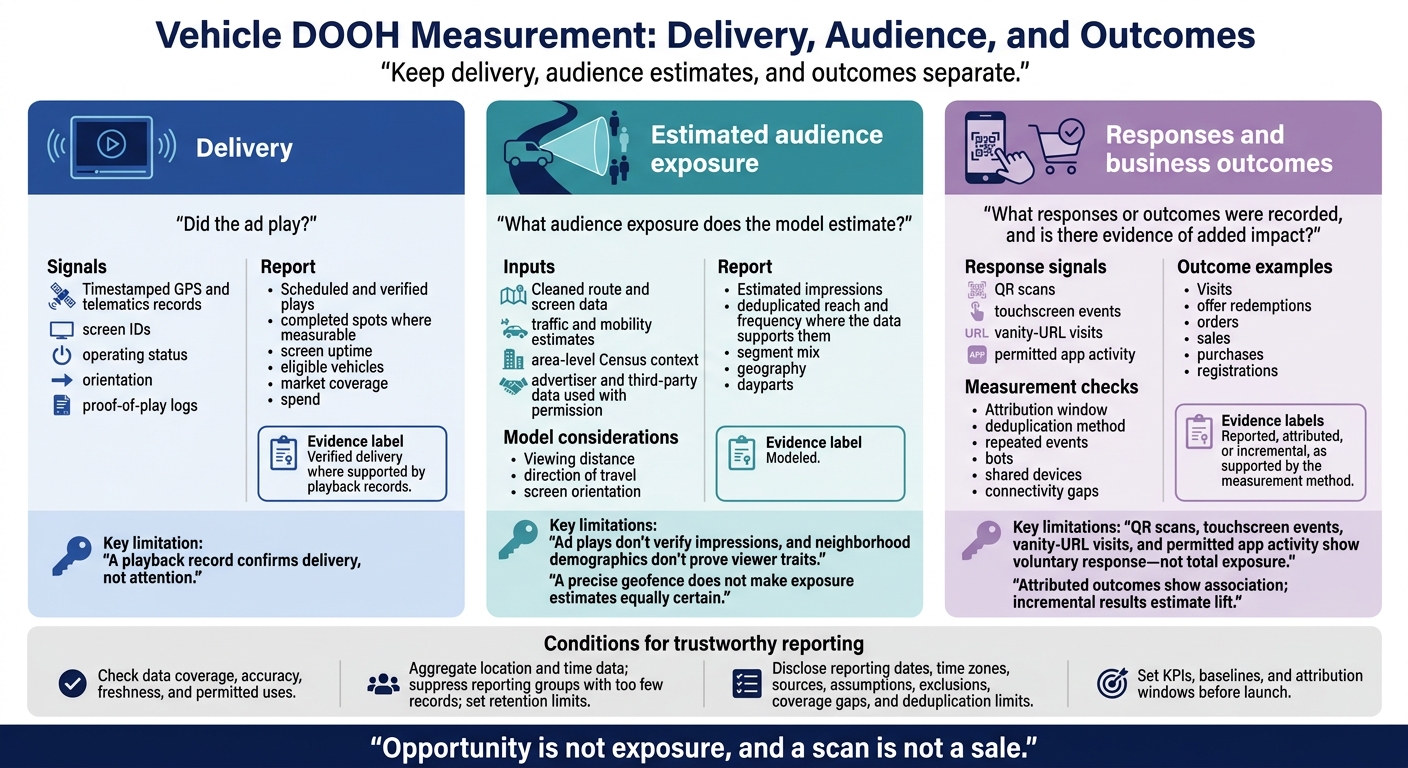
Vehicle DOOH Measurement: Delivery, Audience, and Outcomes
Check data availability before choosing KPIs. Before using a source, record its owner, collection method, coverage, last update, accuracy, retention period, and permitted uses. Confirm that you can combine it with GPS data, activate audience segments, and share advertiser reports. Don’t claim demographic reach or attribution without verified data and permission. These checks determine which location- and time-based (geo-time) segments and KPIs you can support later.
Collect timestamped GPS and telematics records alongside screen IDs, operating status, orientation, and proof-of-play logs. Match these records by screen and time. Flag missing coordinates, offline screens, and differences between scheduled ads and actual playback.
Traffic and mobility estimates add movement patterns, while U.S. Census data provides area-level context. Advertiser and third-party data used with permission can support audience analysis, but doesn’t establish individual viewers’ identities or traits. Exposure models should account for viewing distance, direction of travel, and screen orientation. Once cleaned, the data can support location- and time-based segments.
QR scans, touchscreen events, vanity-URL visits, and permitted app activity show voluntary response - not total exposure. They measure engagement among participants, not everyone who may have seen an ad.
Check for repeated events, bots, shared devices, and connectivity gaps before reporting distinct responses. State the attribution window and deduplication method. A device or scan doesn’t automatically represent a separate person.
Audit missing records, delayed uploads, route changes, vehicle substitutions, screen downtime, time zones, and data age. Ad plays don’t verify impressions, and neighborhood demographics don’t prove viewer traits. Report delivery counts, modeled exposure, and response events separately, and disclose exclusions and coverage gaps. Treat response data as a separate signal, not a substitute for total audience exposure.
Removing names doesn’t automatically anonymize precise location data. Aggregate location and time data, suppress reporting groups with too few records, and collect only the fields you need. Use role-based access controls, encryption, and audit logs. Set retention limits and deletion procedures.
Before activation, have counsel review applicable U.S. state privacy laws, consent requirements, consumer rights, and sensitive-location restrictions. Vendor terms should address allowed uses, data ownership, secondary use, retention, deletion, and audit rights.
Don’t turn routes or neighborhood patterns into claims about health, religion, immigration status, or other sensitive traits. Put these controls in place before using the data to build geo-time audience segments.
Once the data is clean and permissions are set, turn those signals into audience rules based on location and time.
Start with the business outcome. Then choose the geofence, dayparts, ad content, and eligible screens to match. Test the rules against actual travel patterns and reachable locations. For store traffic, focus on visits, offer redemptions, or orders. For awareness, focus on estimated reach and frequency.
Define the audience using supported demographic, mobility, behavioral, contextual, or first-party signals. Before launch, check inventory and document the measurement method, exclusions, and frequency caps.
Hypothetical restaurant campaign: To drive weekday lunch visits, target vehicles within 1 mile of participating restaurants along office and transit corridors, Monday through Friday, from 11:00 a.m. to 2:00 p.m. Use lunch-offer creative and measure redemptions or qualified visits.
| Segment type | Typical source | Targeting precision | Refresh rate | Main use | Limitation |
|---|---|---|---|---|---|
| Demographic | Aggregated census, modeled audience, or market data | Medium at area level | Monthly or quarterly | Broad reach and media planning | Shows area traits, not verified passengers. |
| Mobility | Aggregated GPS, visitation, route, or movement data | Medium to high for patterns | Daily, weekly, or campaign-specific | Commuter, airport, retail, dining, and venue targeting | Coverage, consent, and accuracy vary. |
| Behavioral | Permissioned app, visitation, or interest signals | Medium to high at sufficient scale | Daily or near real time | Reaching likely visitors or interest groups | Can be sparse or unavailable. |
| Contextual | Route, screen, venue, traffic, event, and weather data | High for immediate context | Real time or scheduled | Matching ad content to current surroundings | Shows context, not identity. |
| First-party | Advertiser CRM, loyalty, site, app, or purchase data | High when consented and matchable | Advertiser-defined, often daily | Customer activation, suppression, or retention | Needs consent, secure matching, and platform support. |
Area targeting and permissioned matching are separate methods. An airport zone supports an airport-area opportunity segment - not a verified traveler identity. Permissioned matching uses an authorized advertiser audience through an approved privacy-preserving process. Report the two approaches separately.
A precise geofence does not make exposure estimates equally certain. Use these segment types to describe likely audience behavior, not individual identity.
Compare operating zones with audience estimates and available screens using cleaned route and screen data. Choose cities or DMAs for broad reach, ZIP codes or neighborhoods for local planning, corridors for recurring travel, radii for proximity, and custom polygons for irregular airport or venue boundaries.
Past rideshare routes do not guarantee future routes. Choose boundaries with enough expected inventory. Specify the time zone, effective dates, exclusions, and what happens when vehicles leave those boundaries.
Next, check whether route and screen conditions support delivery. Compare weekday, weekend, holiday, and event schedules rather than applying one audience assumption to every daypart. Review commuter periods, meal hours, venue hours, route repetition, dwell time, and vehicle availability.
For rooftop screens, assess travel direction, screen angle, viewing distance, speed, and obstructions. For in-taxi screens, assess occupancy, trip duration, screen activation, and attention time. Repeated trips can increase frequency without increasing reach.
Keep delivery, audience estimates, and outcomes separate. Track scheduled and verified plays, completed spots where measurable, screen uptime, eligible vehicles, market coverage, and spend. Playback logs confirm that ads played - not that people watched. Delivery feedback may arrive near real time, while modeled audiences and business outcomes take longer to process. Label fields as verified, reported, modeled, attributed, or incremental.
For audience reporting, include estimated impressions, deduplicated reach and frequency where the data supports them, segment mix, geography, and dayparts. Use these formulas:
Name the comparison population used for the audience index. Disclose reporting dates, time zones, sources, update schedules, assumptions, and deduplication limits. Agree on these definitions before comparing campaign goals, channels, or buying methods.
Match each goal to the outcome you’ll measure. Set KPIs, baselines, and attribution windows before launch. Align the window with the purchase cycle, and compare equivalent markets and periods.
Report exposed and control sample sizes, match rates, and uncertainty where available. Attributed outcomes show association; incremental results estimate lift. Use holdouts, matched markets, or synthetic controls where feasible. Flag small samples and gaps in sales coverage.
| Goal | KPIs | Data needed | Reporting frequency and method |
|---|---|---|---|
| Awareness | Recall, awareness, consideration, reach and frequency | Audience estimates, baseline, survey sample | Weekly audience updates; pre/post or exposed/control surveys |
| Engagement | QR scans, tablet interactions, website visits, app activity, search lift | Interaction logs, campaign tags, web/app analytics, search data | Daily or weekly activity; baseline comparisons or controlled lift studies |
| Visitation | Visits, visitation rate, cost per visit | Exposure estimates, permissioned location matching, defined visit window | Weekly or post-campaign; matched controls or geographic tests |
| Conversion | Sales, purchases, registrations, cost per conversion; incremental results and costs where supported | Transactions, purchase-cycle window, exposed and control groups | After the purchase window closes; holdouts, matched markets, or synthetic controls |
Use the same audience and delivery definitions for programmatic buys. Enroute View Media supports rooftop LED screens, in-taxi touch-screen tablets, cloud-based white-label screen management, geo-time targeting, real-time analytics, and programmatic integration.
Before activating geo-time segments, run test delivery to verify demand-side and supply-side connections, permitted datasets, measurement methods, deal IDs, pricing floors, pacing, screen specifications, ad approval, and proof-of-play fields.
For supported time, weather, traffic, or event triggers, document the source, update rate, threshold, fallback ad content, and execution logs. Real-time analytics show delivery signals, not deduplicated audience counts.
Use differences in the scorecard to decide whether to change routes, schedules, inventory, or ad content. Compare planned and actual delivery, uptime, coverage, spend, and audience estimates before moving budgets.
Test one major change at a time, and keep measurement definitions consistent. Apply frequency controls only at the supported level: limiting screen or route repetition does not cap how often a person sees an ad. Account for seasonality, route changes, small samples, audience-model revisions, and delayed conversions rather than reacting to a single day’s audience estimate.
After collecting, segmenting, and reporting the data, use it to decide where and when to buy. Rooftop metrics reflect route-based exposure. In-taxi metrics reflect occupancy, dwell time, and interaction. Report modeled audience and playback separately. Neither proves attention.
Use geo-time segments to choose placements - not to make identity or purchase claims. Collect only the data you need, aggregate location records, limit retention, and suppress small groups.
Keep delivery and outcome metrics separate, then use the patterns to guide pricing and budgets. Fleet owners can price inventory based on route quality, daypart demand, screen type, and verified delivery.
Use the evidence to inform decisions, not promise results. Opportunity is not exposure, and a scan is not a sale.
Monitor analytics continuously and check them against operations records. Calibrate and maintain sensors regularly to spot discrepancies and account for vibration or glare.
Cross-check multiple data sources. Combine GPS movement data with camera-based motion sensors to confirm passenger presence. Then compare playback logs - including exact timestamps and locations - with reported impressions to check whether ad delivery matches projected audience exposure.
Reliable audience segments start with your campaign goals, not a fixed amount of data. Collect only what you need to meet those goals.
Real-time targeting uses immediate, anonymized camera feeds to detect presence and demographic signals. Broader performance analysis relies on GPS coordinates, sensor-verified exposure, and proof-of-play logs. Choose geographic, time-based, or demographic-sensing data based on what your business needs to achieve.
Start with specific, measurable audience segments within 5 to 50 miles of key business locations. Use real-time analytics to track QR scans, NFC taps, or foot traffic at geofenced locations.
Run A/B tests with different ad versions at the same time on similar routes. Shift budget toward the zones, routes, or times of day that perform best, and pause segments that fall short. Set trigger-based rules so ads run only when your target audience is present or during peak times.
Need pricing details?
EnrouteViewMedia is a Canadian technology company based in Edmonton, Alberta, Canada. The company was founded by a group of media entrepreneurs and engineering executives. Our mission is developing leading-edge digital media display technologies for taxicab rooftops and taxicab interiors advertising market. Through our easy to use ad delivery and management system, we assist our clients in reaching their customers with targeted exposure. EnRouteViewMedia continuously strives to be the global leader in digital geo-time targeted advertising media systems for modern taxi fleets.