
Matching screen brightness to ambient light cuts power draw, protects batteries, and ensures local compliance.
Brighter screens use more power, cost more to run, and can create legal problems at night. If I run screens in taxis, rideshare cars, or ad fleets, the takeaway is simple: keep brightness high only when sunlight demands it, then dim it fast when light drops.
Here’s the article in plain English:
Bottom line: brightness is not just a screen setting. It affects kWh use, vehicle power draw, and whether a screen stays within local rules.
If I had to reduce the whole study to one line, it would be this: match screen brightness to actual viewing conditions, not the brightest part of the day.
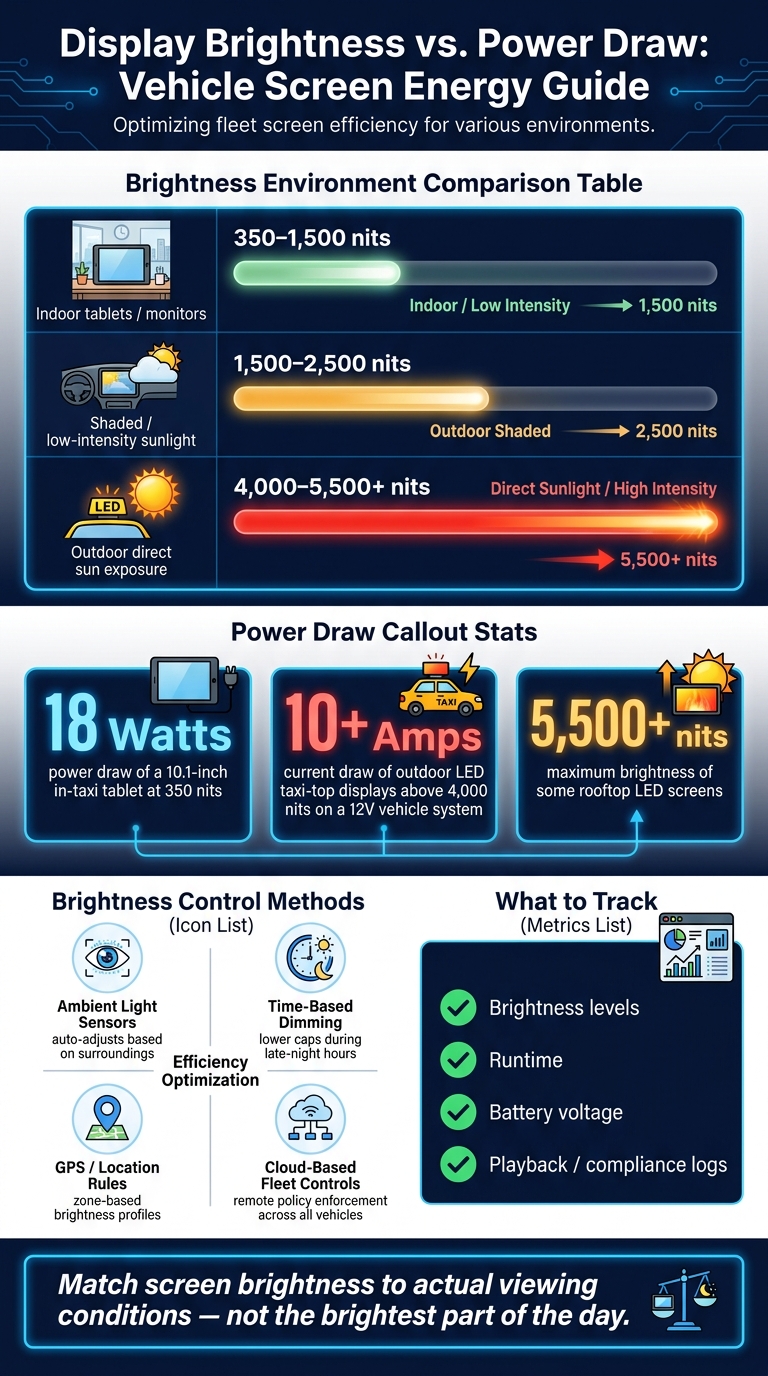
Display Brightness vs. Power Draw: Vehicle Screen Energy Guide
Brightness settings have a direct effect on power draw, especially for vehicle screens that pass through full sun, shade, and nighttime conditions.
Display brightness is measured in nits (cd/m²). The right level depends on where the screen is being viewed and how much ambient light is present.
| Display Environment | Typical Brightness Range |
|---|---|
| Indoor tablets / monitors | 350 – 1,500 nits |
| Shaded / low-intensity sunlight | 1,500 – 2,500 nits |
| Outdoor direct sun exposure | 4,000 – 5,500+ nits |
The jump in power use can be steep at the high end. Outdoor LED taxi-top displays that run above 4,000 nits can draw 10 amps or more from a vehicle’s 12V system. Over long hours on the road, that gap adds up in kWh.
Brightness isn’t the only thing in play. Panel efficiency, screen technology, and even the type of content shown can shift the exact number. Still, brightness is one of the main drivers of power consumption.
This is where vehicle displays differ from fixed signage. A screen on a moving vehicle doesn’t sit in one lighting condition. It can go from harsh midday sun to a shaded street, then into dark evening traffic in the same trip.
If that display stays locked at full brightness the whole time, it burns extra power when it doesn’t need to. That’s wasted energy.
Modern displays deal with this by using ambient light sensors to adjust brightness based on the surroundings. In shade or at night, the screen can dim and still stay readable. That lowers wasted power and also helps keep nighttime output within local brightness rules.
The same brightness controls that affect visibility also shape whether a vehicle display follows local sign rules. In the U.S., cities and states set brightness limits for digital displays to cut glare, reduce light pollution, and support road safety. Those limits change by jurisdiction, and many areas apply tighter caps at night.
Most rules set a maximum brightness level, require automatic dimming, and often call for ambient light sensors so the display adjusts on its own instead of relying on manual changes.
For fleets working across more than one jurisdiction, that can get messy fast. A setting that works in one city may not work in the next. That’s why fleets need centralized brightness control, so each vehicle can stay within local limits wherever it operates.
Nighttime dimming is the main compliance issue because brightness limits usually get stricter after dark. A high-brightness screen might look fine during the day, but at night it can create glare in low-light conditions and distract nearby drivers. Many U.S. jurisdictions require nighttime dimming for that reason, as part of broader road-safety and light-pollution rules.
Integrated light sensors help rooftop and in-taxi screens dim automatically based on ambient light. In plain terms, the display reads the surroundings and adjusts output without someone stepping in, which helps keep nighttime brightness within local limits.
Once the research is done, the next step is practical: how do fleets use brightness settings without burning extra power? The short answer is to match screen brightness to actual conditions.
In day-to-day use, that usually comes down to three controls working together. Ambient-light sensors make live adjustments on their own, dimming the screen when a vehicle moves from bright sun into shade or into nighttime driving. Daypart rules add a schedule on top of that, with lower brightness caps during late-night hours to cut energy use and limit glare. Location-based caps let operators turn brightness up in busy daytime corridors and dial it down in residential areas.
That shifts brightness from a fixed setting to a policy choice.
At fleet scale, software is what makes those rules stick. Manual brightness control might work for one vehicle. It does not work across a full fleet. A cloud-based screen management platform can send brightness rules to every device, which cuts the need for on-site changes.
Enroute View Media includes this in its platform. Its rooftop LED screens and in-taxi touch-screen tablets connect to a cloud-based management system that supports time- and location-based policies. That means brightness schedules can be tied to both the time of day and the vehicle’s GPS location.
Geofencing adds another layer. Operators can split a city into zones and assign different brightness profiles to each one. If a vehicle enters an area with stricter nighttime rules, the system can switch to a lower preset automatically, with no driver action needed. Use brightness presets based on the use case and viewing distance.
Real-time monitoring fills in the rest. Operators can check screen status, view live screen views, and get alerts if a device goes offline or fails to follow its dimming schedule.
The right metrics turn brightness policy into something you can check, not just something you hope is working.
Track:
Brightness profiles by time of day help confirm that scheduled dimming is happening as planned. Battery voltage logs show whether the power monitor shuts the display down before battery voltage drops below 12 volts. Playback reports with GPS timestamps give advertisers an operating record and show that automatic dimming and preset limits were active during each operating period.
Those same logs can also help if a local agency asks for proof of compliance.
Brighter displays use more power. That adds battery strain, pushes up operating costs, and can create compliance issues. Some rooftop LED screens reach 5,500 nits, and that level of brightness can cut EV runtime and lead to more frequent charging.
So brightness shouldn't be treated like a fixed setting. It should be managed like any other operating variable. Use higher brightness in direct sunlight, dial it down at dusk, and switch to the lowest compliant setting at night.
Brightness, then, is more than a display setting. It's an operational control. Automated light sensors can adjust levels in real time, while cloud-based platforms can enforce brightness rules across an entire fleet. That helps reduce energy waste, protect battery health, and keep each vehicle within local ordinance limits. For fleet operators, a small technical setting can become a practical tool for cost control and compliance.
Lowering a digital display’s brightness is one of the simplest ways to cut power use. In most cases, the brighter the screen, the more power it pulls. So when you dim the display, you reduce the load on the vehicle battery.
For Enroute View Media clients, pairing these settings with power monitoring helps displays run efficiently without putting the vehicle’s electrical system at risk.
The right nighttime brightness depends on two things: the display hardware and the conditions around it. To balance visibility, power use, and light pollution, Enroute View Media uses integrated light sensors that adjust screen brightness on their own.
That means the display stays clear at night without using more power than needed. It also removes the hassle of manual adjustments.
Fleets can show brightness compliance with Enroute View Media’s built-in light sensors. These sensors adjust screen brightness in nits on their own, based on live conditions like direct daylight or shade.
Compliance is handled through DigiStreamView. It gives teams remote control, live device monitoring, playback reports, and screen uptime tracking, making it easier to confirm performance and meet local rules.
Need pricing details?
EnrouteViewMedia is a Canadian technology company based in Edmonton, Alberta, Canada. The company was founded by a group of media entrepreneurs and engineering executives. Our mission is developing leading-edge digital media display technologies for taxicab rooftops and taxicab interiors advertising market. Through our easy to use ad delivery and management system, we assist our clients in reaching their customers with targeted exposure. EnRouteViewMedia continuously strives to be the global leader in digital geo-time targeted advertising media systems for modern taxi fleets.